






Are you still risking using LCD screens that look “identical” to others?

Introduction: The Illusion of “Looks the Same”
You are still taking risks. The screens look identical. But they are not the same.
The A2681 and A3113 LCD assemblies appear almost exactly alike. From the front, you cannot tell them apart. They even fit into the same hinge mechanism.
But there is a hidden danger.If the connector receptacle is even slightly wrong, the consequences are severe. It can burn the connector. It can damage the logic board. And it will cost you far more than a single replacement screen.
We never take risks with quality. Neither should you,This is not theory. This is not marketing hype. This is hardware fact. Ignore it, and you will eventually pay — in cash, in time, and in reputation.
A3113 vs A2681: Similar Appearance, Different Design
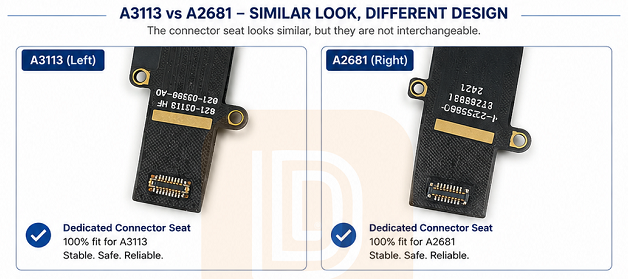
Let us state the critical fact plainly,A3113 and A2681 use different connector receptacles. They are not interchangeable. They were never designed to be.
Yes, they look similar to the naked eye. Yes, they share the same physical footprint. Yes, the pin count appears identical,But the internal pin mapping is completely different. The voltage routing is different. The signal assignments are different.
Apple built these two LCD assemblies for two different MacBook generations. The visual similarity is coincidental. The physical fit is not an invitation to mix them.
If you force an incompatible LCD into a logic board, you are not repairing. You are creating a disaster. That disaster will not happen today. It will happen tomorrow — when your customer has already left your shop.
The Connector Receptacles: A Closer Look
Let us examine the connectors themselves. This is where the entire problem lives.
For the A3113 (Left Side):
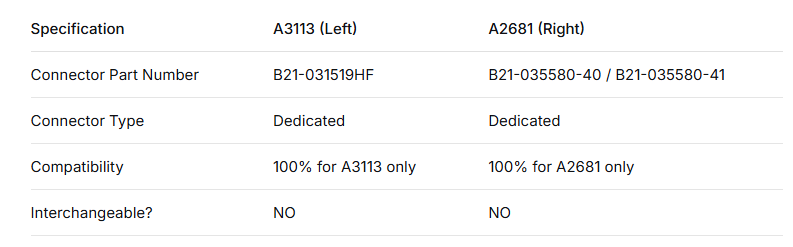
- Connector part number: B21-031519HF
- Designed specifically for the A3113 logic board
- Proprietary pin configuration
- Cannot be replaced with the A2681 connector
For the A2681 (Right Side):
- Connector part numbers: B21-035580-40 and B21-035580-41
- Designed specifically for the A2681 logic board
- Different internal routing
- Cannot be replaced with the A3113 connector
To the naked eye, these two connectors look nearly identical. The plastic housing is the same color. The metal pins are arranged in a similar pattern. The locking mechanism feels the same when you press down the cable.
But “looks the same” is not a quality standard. It is a trap.
Under a microscope, the differences become obvious. The pin assignments are different. The voltage rails go to different locations. The backlight power circuit is mapped differently.
What works perfectly on an A3113 will slowly — or instantly — destroy an A2681 logic board.
What Happens When You Use the Wrong Connector
You might be thinking: “It fits. It turns on. The screen lights up. It is probably fine.”That assumption is dangerous. It is expensive. And it is completely wrong.
When the connector receptacle is incorrect, even temporary function is a lie. Underlying electrical mismatches cause progressive and irreversible damage.
Here is exactly what happens.
Burned Connector Receptacle
A. Burned Connector Receptacle
This is the most common failure mode.Excessive current flows through pins that were never designed for that load. Incorrect pin contact creates resistance. Resistance generates heat,Within minutes — or sometimes days — the connector receptacle on the logic board burns out.
Once burned, the entire logic board requires microsoldering work. In many cases, the board is beyond repair. The customer loses their data. You lose their trust.
B. Circuit Board Damage
The logic board’s power delivery circuits are engineered for specific loads,Every capacitor, resistor, and integrated circuit on the voltage regulation path is selected based on the exact power draw of the correct LCD assembly.
When you install a mismatched LCD, the power draw is wrong. Too much current. Wrong voltage. Incorrect signal timing.
The result? Blown capacitors. Damaged PCB traces. Fried ICs.
Sometimes the damage is invisible — until the board fails completely two weeks later.
C. Short Circuit / No Display
In many cases, the system detects a fault immediately. It shuts down the display output entirely.
You get one of these symptoms:
A black screen with backlight only
Backlight with no image at all
Intermittent flashing or flickering
Lines or artifacts on the screen
Complete no-power situation on the display rail
Sometimes the LCD itself survives. Often it does not. Either way, you are now looking at a second repair — or a full logic board replacement.
D. The Hidden Cost,Let us talk about money. This is what matters at the end of the day.
A wrong LCD connector can cost you:
A new logic board: $300 to $800, depending on the model
Microsoldering labor: $100 to $250, if the damage is repairable
A replacement LCD anyway: Because the mismatched one may also be damaged
Customer refund or chargeback: The full cost of the original repair
Lost future business: One angry customer tells ten people
All of this — every single dollar — because a $5 connector was the wrong one.

Why Risking Your Reputation Is Never Worth It
In the repair business, reputation is everything. You know this. I know this.
A customer walks into your shop with a cracked MacBook screen. You quote them a price. They agree.
You replace the screen with an “almost compatible” LCD assembly. Maybe you wanted to save money. Maybe your supplier sent you the wrong part.
The screen works for a week. Then the logic board fails.
Now answer this honestly: who does the customer blame?
They do not blame the parts supplier. They do not blame the “identical looking” connector. They do not blame Apple for designing two similar-but-different LCDs.
They blame you.
You are the professional. You are the one who installed the part. You are the one who said the repair was done.
One wrong LCD assembly can destroy everything you have built.
- It can destroy a customer’s logic board and all their data.
- It can cost you a full refund plus return shipping.
- It can lose you a repeat customer forever.
- It can generate a negative online review that stays up for years.
- It can damage your shop’s rating on Google, Yelp, or repair forums.
Do not risk your hard-earned reputation on a connector that looks “close enough.”We have seen repair shops close because of this exact problem. Not because they were bad technicians. Because they trusted the wrong parts.
What We Do Differently — And Why It Matters
We do not make “universal” parts. We do not make “one-size-fits-all” components.
We make the right parts. Every single time,Every LCD assembly we offer for the A2681 and A3113 is built with model-specific engineering. No guesswork. No “maybe it works.” No sending you a part that “should” be compatible.
✅ 100% Dedicated Connector Receptacles
We use the exact connector for each specific model.
A3113: B21-031519HF
A2681: B21-035580-40 / B21-035580-41
No substitutions. No “compatible with both” lies. Just the correct connector.
✅ Model-Specific Backlight Strips
Backlight voltage and current requirements differ between models,We match the correct backlight strip to each LCD assembly. This gives you stable backlight brightness. No flickering. True color reproduction. Longer backlight lifespan.
✅ OEM-Quality Components
We use original-quality materials. Not cheap generics. Not factory seconds. Not refurbished rejects,Every component meets or exceeds OEM specifications. You get stable backlight. True color display. Zero flickering.
✅ 100% Pre-Shipment Testing
Every single LCD assembly is tested before it leaves our facility.We test full display function. We test brightness levels and uniformity. We test backlight stability. We test all cables and connectors. We test physical fit and alignment.No exceptions. No shortcuts.
✅ Perfect Fit. Long-Term Reliability.
When you install our LCD assemblies, you get perfect fit. Perfect function. Perfect reliability,No modification required. No “making it work.” No wondering if you got the right part.
Pre-Shipment Testing: No Exceptions
We test every single LCD assembly before shipping,Not a random sample. Not every tenth unit. Every single unit.
Here is what our testing process includes.
Function Test: We connect the LCD to a known-good logic board and verify full display operation. No dead pixels. No lines. No artifacts.
Brightness Test: We measure brightness levels across the entire screen. Uniformity is verified. No dark spots. No uneven backlight.
Backlight Stability Test: We run the display for an extended period to confirm stable backlight operation. No flickering. No dimming. No failure.
Cable and Connector Test: Every cable is checked for damage. Every connector is inspected under magnification. No bent pins. No cracked housings.
Physical Fit Test: We verify that the LCD assembly fits correctly in the intended hinge and housing. No alignment issues. No pressure points.
Only after passing all tests does a unit leave our warehouse,This is why our failure rate is near zero. This is why repair shops trust us.
Ready to Work With a Reliable Supplier?
We are not the cheapest supplier. We are the correct supplier.
Here is what we offer to every repair shop and technician.
Real-Time Pricing and Inventory: No backorders. No surprises. No “we thought we had it in stock.” You see exactly what we have. You get exactly what you order.
Technical Support: You need us? We are here. Before the sale. During the repair. After the installation. Our team knows MacBooks. We answer your questions quickly.
Bulk Pricing for Repair Shops: Volume discounts for shops that do multiple repairs per week. Protect your margins. Grow your business.
Fast Shipping: Your customers are waiting. We ship within 24 hours on most orders. Express options are available.
No-Risk Returns: Wrong part? Defective unit? We make it right. No arguing. No restocking fees for our mistakes.
Closing Statement
Correct parts. Proper fit. Smart choice.you have a choice every time you order an LCD assembly,you can save a few dollars on a “universal” or “looks the same” part. But you risk burning a logic board. You risk losing a customer. You risk damaging your reputation.
Or you can work with a supplier who gives you the exact, correct, tested part for each specific model.
We have made our choice. We never take risks with quality,DT-Smart-Your trusted MacBook LCD partner.